CodeSage Pro · v1.2

AI that solves the problem
while you're still reading it.

Real-time AI assistance during coding interviews and technical challenges. Screen-share invisible macOS overlay + Chrome extension. Powered by Claude AI.

Free download · License managed in-app · No account required

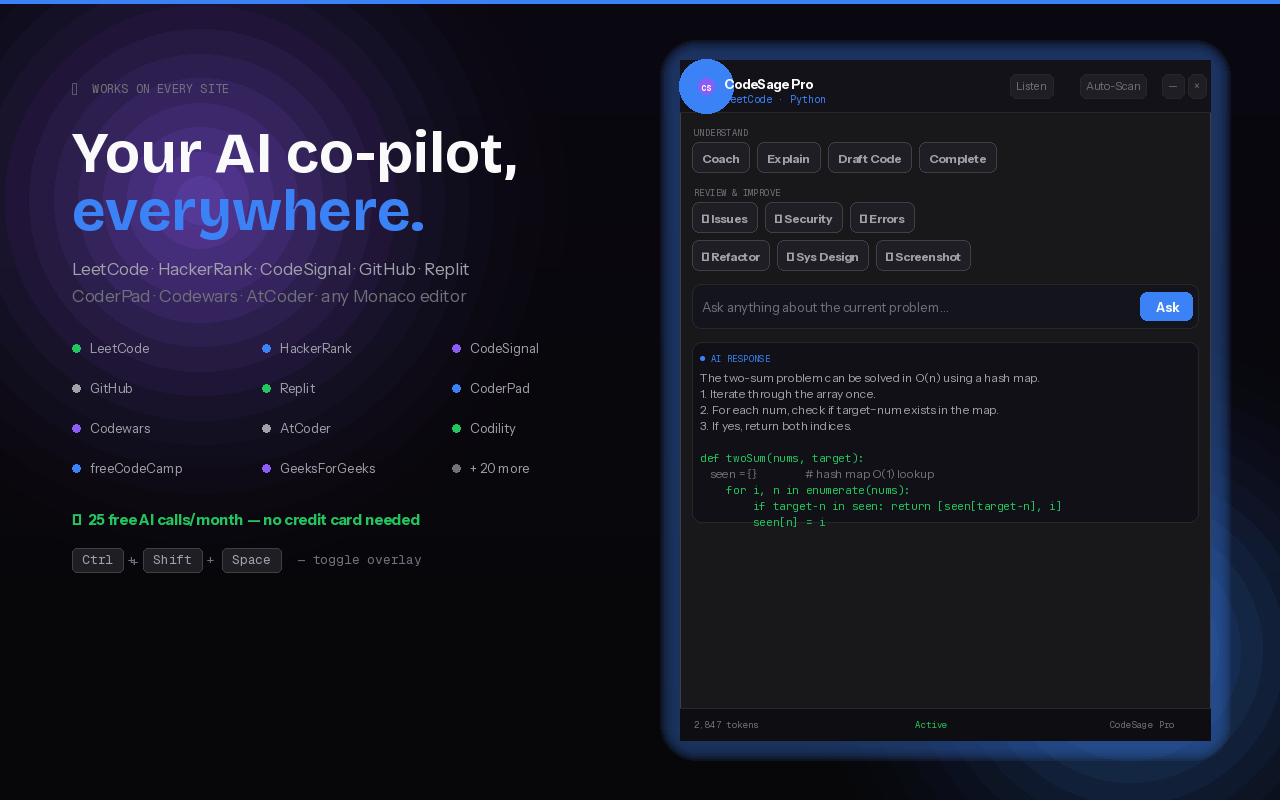
leetcode.com / problems / two-sum // Given an array of integers nums and a target… func twoSum(nums []int, target int) []int { seen := make(map[int]int) for i, n := range nums { if j, ok := seen[target-n]; ok { return []int{j, i} } seen[n] = i } } CS CodeSage Pro screen-share invisible · v1.2 🎤 Listen 📸 Capture × Understand the current code or topic Coach Explain Draft Code Complete How To Use Review & improve (auto-detects the language) 🔎 Issues 🛡 Security ⚠ Errors ✨ Refactor 🔬 Tests 🏗 Sys Design Ask anything — works on every coding site… Ask ⟳ Capturing screen… analyzing with Claude AI… FIND ISSUES 🔴 Critical twoSum() L4 — early return doesn't handle empty input Fix: if len(nums) == 0 { return nil } 🟠 Medium • Map allocation could be skipped for n < 3 (constant-factor) • No explicit nil return when no pair found — implicit undefined ⌘⇧Space toggle · ⌘⇧S capture · ⌘⇧L listen · ⌘⇧K focus · ⌘⏎ submit

Built for real interview pressure.

Three pillars that make CodeSage Pro the most effective interview companion available.

🚫

Screen-Share Invisible

The macOS overlay uses NSWindow.sharingType = .none, making it invisible to Zoom, Meet, Teams, OBS, and all screen capture. Only visible on your physical display.

13 AI Actions

Coach, Explain, Draft Code, Find Issues, Security Review, Refactor, Generate Tests, System Design, and more — all powered by Claude AI.

🔒

Zero Server, Full Privacy

No tracking, no analytics, no server. Your API key goes directly from your device to Anthropic's API. Mac app stores keys in macOS Keychain.

13 actions at your fingertips.

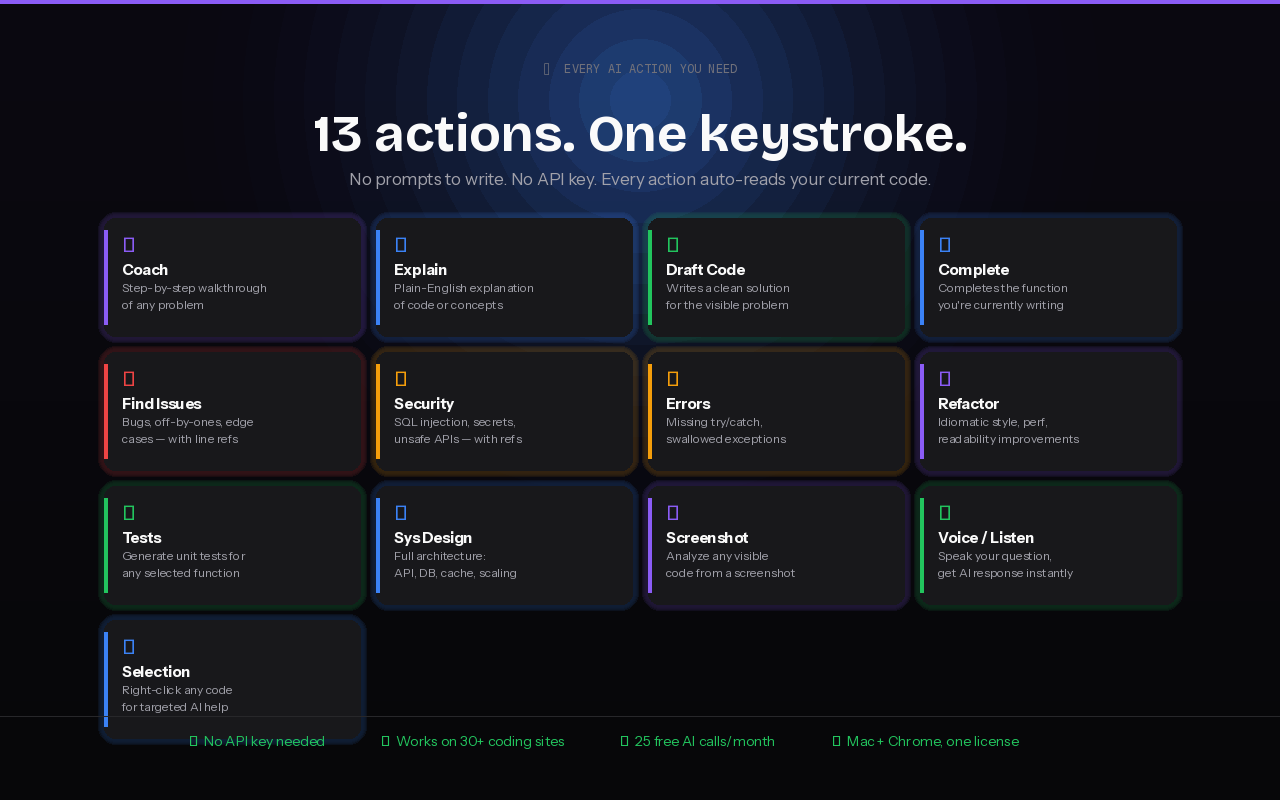
Every action is context-aware — it reads the code on your screen and delivers targeted assistance in seconds.

Understand
🧭
Coach
Guided next step hint
📚
Explain
Plain-English walkthrough
💻
Draft Code
Complete solution + complexity
Complete
Finish your function
💡
How To Use
Usage recipe for your code
Review & Improve
🐛
Find Issues
Bugs and edge cases
🛡
Security Review
Injections, unsafe APIs
Error Handling
Audit missing try/catch
🔄
Refactor
Idiomatic rewrite with diff
🔬
Generate Tests
Unit tests for your code
🏗
System Design
End-to-end architecture
Special
📸
Screenshot Analysis
Captures + OCR + solves
🎤
Voice / Listen
Hands-free via speech

Up and running in 5 minutes.

No account required — just your Anthropic API key.

macOS App

5 Steps · Native Swift App

Download CodeSage Pro.dmg 551 KB
1

Download

Click the button above to download CodeSage Pro.dmg.

2

Install

Open the DMG, drag CodeSage Pro to your Applications folder.

3

First Launch

macOS will show an "unverified developer" warning. Right-click the app → Open → Open to bypass Gatekeeper.

4

Add API Key

Open Settings from the menu bar icon, paste your Anthropic API key. Stored securely in macOS Keychain.

5

Grant Permissions

Press Cmd+Shift+S to trigger Screen Recording permission. Go to System Settings → Privacy & Security → Screen Recording. Enable CodeSage Pro. Quit and relaunch.

Chrome Extension

4 Steps · Manifest V3

Download Chrome Extension (.zip) 81 KB
1

Unzip & Open Extensions

Unzip the download, then navigate to chrome://extensions in Chrome.

2

Developer Mode

Toggle on "Developer mode" using the switch in the top-right corner.

3

Load Extension

Click "Load unpacked" and select the chrome-extension folder from the download.

4

Configure

Click the toolbar icon, paste your Anthropic API key, and toggle the overlay ON.

Required system permissions.

CodeSage Pro only requests permissions when a feature that needs them is first triggered.

PermissionWhen TriggeredWhere to Grant
Screen RecordingFirst Cmd+Shift+S screenshot or Listen modeSystem Settings → Privacy & Security → Screen Recording
Speech RecognitionFirst time Listen mode startsSystem Settings → Privacy & Security → Speech Recognition
MicrophoneOnly when switching Listen source to MicrophoneSystem Settings → Privacy & Security → Microphone
After granting any permission, quit and relaunch the app for changes to take effect.

Keyboard shortcuts.

Muscle memory for when every second counts.

Mac App

Native macOS Shortcuts

Toggle overlay
Space
Screenshot analysis
S
Start / stop Listen
L
Focus Ask box
K

Chrome Extension

Browser Shortcuts

Toggle overlay
CtrlSpace
Find issues / bugs
CtrlI
Screenshot analysis
CtrlS
Submit question
CtrlEnter

Works everywhere you code.

Full support for major coding platforms, plus universal fallback for Monaco, CodeMirror, and Ace editors.

LeetCodeHackerRank CodeSignalGeeksforGeeks InterviewBitCodeChef CodeforcesGitHub GitLabReplit CodeSandboxVS Code Web HackerEarthTopCoder AlgoExpertExercism CodewarsStackBlitz JupyterGoogle Colab CoderPadKarat CodePenJSFiddle + 25 more

Universal fallback: auto-detects Monaco, CodeMirror, and Ace editor instances on any site.

Your data never leaves your device.

Zero-server architecture means zero attack surface. Here's exactly how your data flows.

No server. No analytics. No tracking.

💻

Chrome: Local Storage Only

API key stored in chrome.storage.local. All calls go direct from your browser to api.anthropic.com — no middleman, no proxy.

🔐

Mac: Keychain Encrypted

API key stored in macOS Keychain, encrypted at rest by the Secure Enclave. Never written to plain text or config files.

💨

In-Memory Only

Audio buffers, screenshots, and transcripts exist only in RAM. Never written to disk, never cached, never persisted.

🧠

On-Device Speech

Speech recognition on Apple Silicon runs entirely on-device via the Neural Engine. Audio never leaves your Mac.

Ready to ace your next interview?

Download CodeSage Pro and get AI-powered assistance in under five minutes. No account, no server, no tracking. License managed in-app.

 Download macOS App ⚙ Download Chrome Extension

Free download · Requires your own Anthropic API key · License managed in-app